How to make a wedding seating chart
A step-by-step way to make a wedding seating chart: finalize the guest list, choose table sizes, seat groups first, keep conflicts apart, then print table lists. Try a free seating app demo.
A wedding seating chart is easiest when you build it in a fixed order: who is coming, how many fit at a table, who must sit together, and who should not. Do it in that order and the last few guests fall into place instead of forcing you to start over.
Step 1: Work from replies, not invitations
Wait until your reply deadline has passed, then build the chart from the people who said yes. Note each guest’s plus-one, children, meal choice and any access needs next to their name, so you can see them while you place people.
Step 2: Decide the table sizes
- Count your confirmed guests and divide by the number of seats your venue puts at each table.
- Ask the venue how many tables fit the room and whether round or long tables suit it.
- Leave one or two spare seats at a few tables so a late change does not move everyone.
Step 3: Seat the groups first
Place couples, families and friend groups before individuals. Then fill the remaining seats by mixing in people who already know someone at the table. A table with one person who knows nobody is the thing guests remember.
Step 4: Keep the conflicts apart
List any pairs who should not share a table before you place anyone. It is much easier to avoid a conflict while you are placing people than to find it after the chart looks finished.
Step 5: Check it, then print it
- Every confirmed guest has exactly one seat.
- No table is over its capacity.
- Guests with access needs are near the aisle, the exits or the restrooms as needed.
- Table numbers on the chart match the numbers on your escort cards or sign.
Using a seating chart app instead of paper
The Seating Studio is a web app that opens in your browser on a phone, tablet or computer. Paste in your guest list, pick a guest, pick a table and tap a seat; move or swap anyone and undo the last changes. It exports a seating CSV and printable table lists. The free demo lets you try the same moves with a practice guest list before you decide.
Planners that do this for you
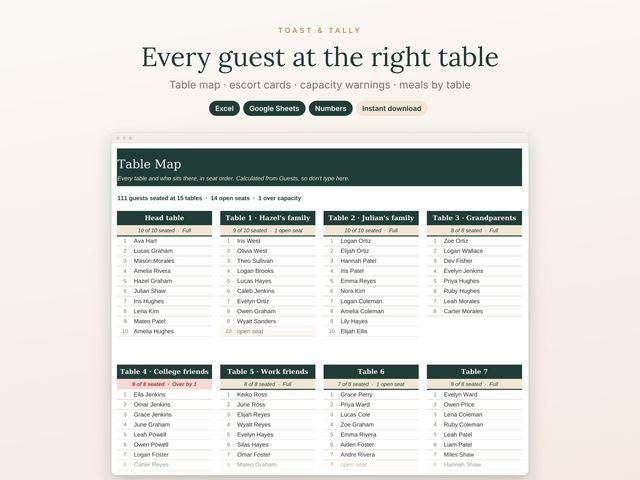
Wedding Seating Chart Planner
$7.00Table map · escort cards · capacity warnings · meals by table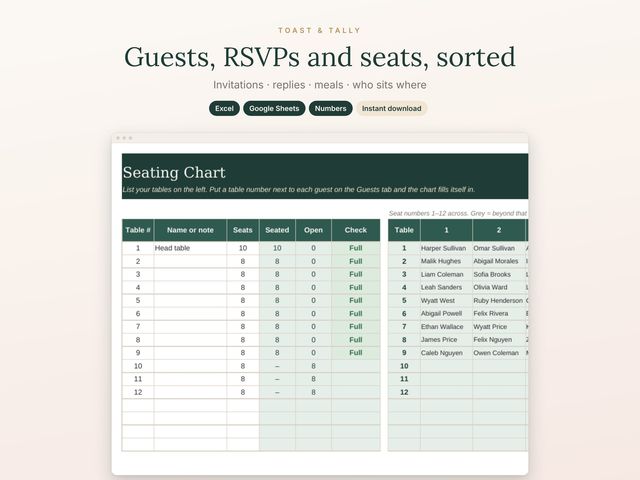
Wedding Guest List, RSVP & Seating Chart
$9.00Invitations · replies · meals · who sits whereHow to track wedding guest replies (RSVPs) first
The Seating Studio: try it free
Plan who sits where on your phone, tablet or computer: pick a guest, pick a table, tap a seat. Up to 1,000 guests and 100 tables, with printable table diagrams.
Try the free seating chart demo See The Seating Studio on Etsy, $16
Updated 2026-10-29.